
Discussion
Loading...

Discussion

  • About
  • Code of conduct
  • Privacy
  • About Bonfire
Larvitz :fedora: :redhat:
@Larvitz@burningboard.net  ·  activity timestamp 2 days ago

Nice!

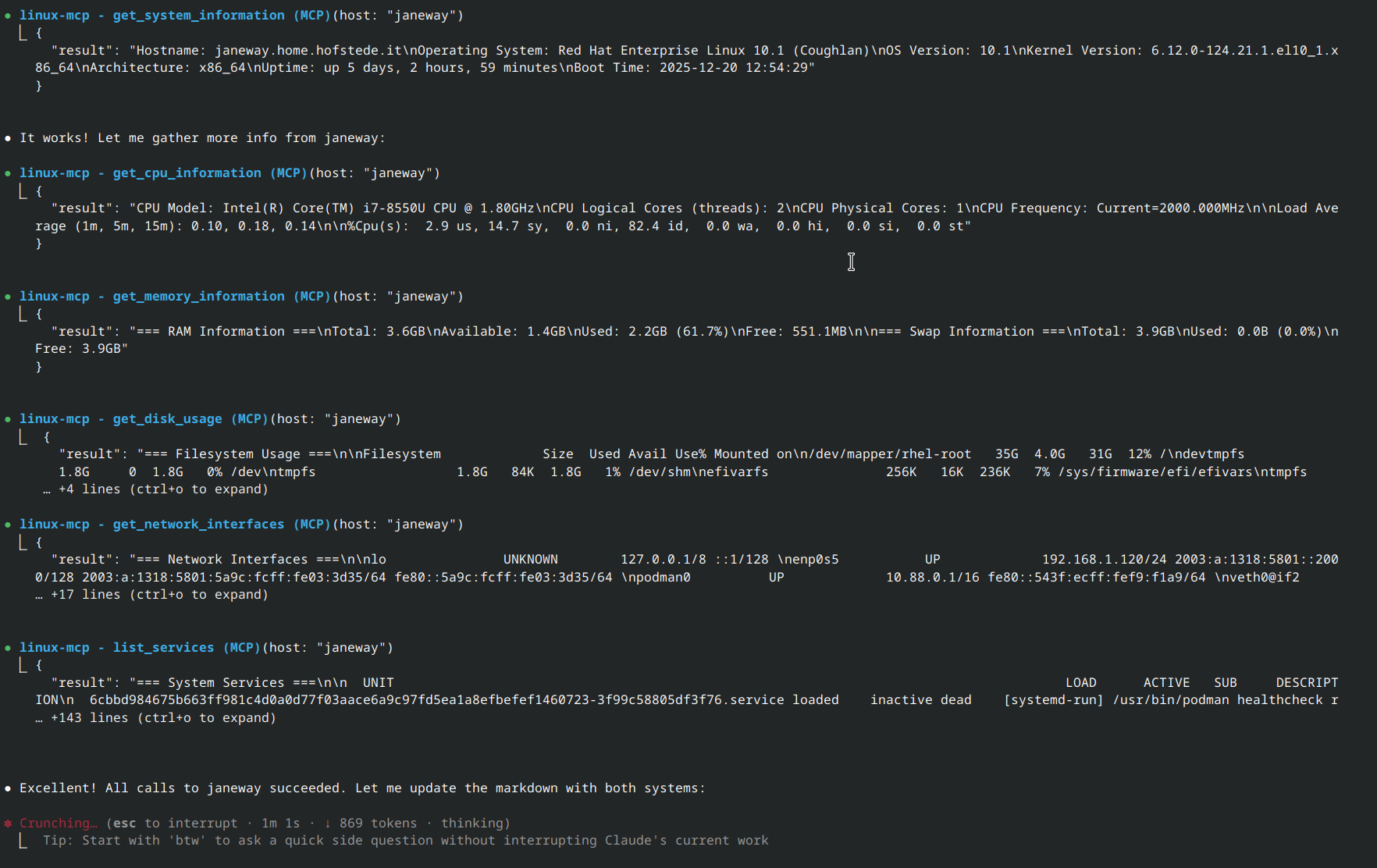
I'm testing Claude Code using the linux-mcp-server to read system information directly from my local machine.

This is a huge enabler for LLM-assisted troubleshooting. It can read logs, check the journal, inspect systemd units, and pull hardware info in real-time.

Repo: https://github.com/rhel-lightspeed/linux-mcp-server

Great Fedora writeup: https://fedoramagazine.org/find-out-how-your-fedora-system-really-feels-with-the-linux-mcp-server/

#Linux #Fedora #LLM #AI #OpenSource #DevOps #ClaudeCode #MCP
Sorry, no caption provided by author
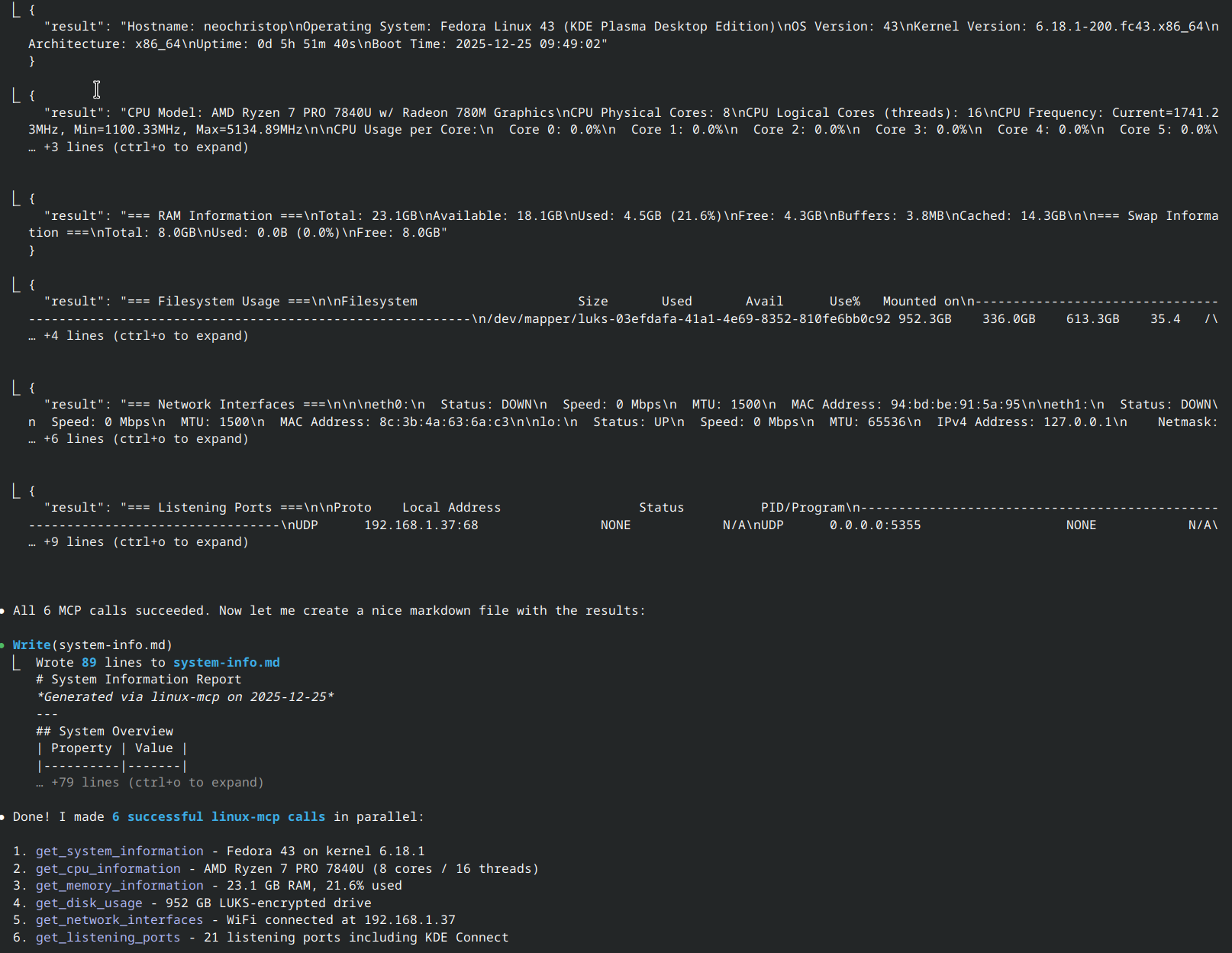
Screenshot of a terminal interface showing 'Claude Code' execution. The system successfully performed 6 MCP calls including get_cpu_information and get_disk_usage. The output shows the system is running Fedora Linux 43 on an AMD Ryzen 7 PRO with 23GB of RAM.


  • Copy link
  • Flag this post
  • Block
Torsten Materna
@torstenmaterna@mastodon.social replied  ·  activity timestamp yesterday

@Larvitz Wie cool. Danke für den Tipp.

  • Copy link
  • Flag this comment
  • Block
Ilkka Tengvall
@ikkeT@mementomori.social replied  ·  activity timestamp yesterday

@Larvitz funny detail that it gives very accurate and useful info, yet it tells to use apt on fedora.

  • Copy link
  • Flag this comment
  • Block
Larvitz :fedora: :redhat:
@Larvitz@burningboard.net replied  ·  activity timestamp yesterday

@ikkeT That's then the LLM/AI Model. The linux-mcp-server just is the technical interface for the AI to gather Linux system information.

  • Copy link
  • Flag this comment
  • Block
Peter König
@peter_koenig@gruene.social replied  ·  activity timestamp 2 days ago

@Larvitz

A way cheaper is to use zed/zeditor and #DeepSeek in agent mode - or to use an AI-chat of your choice to build a script to (remote) execute it on your machine, to read and to analyze the output. Such a DeepSeek task costs nearly nothing.

And to be honest:

For me there is definitely no difference between an #US- or #China-AI

in both cases you should very (very!) carefully look for your secrets and probably work only in test environments with fake IDs and fake PWDs.

  • Copy link
  • Flag this comment
  • Block
Larvitz :fedora: :redhat:
@Larvitz@burningboard.net replied  ·  activity timestamp 2 days ago

@peter_koenig Well, linux-mcp-server is purpose built, delivers structured data to the LLM (can be any US/China model). Also the MCP-Server is purposely built READ ONLY, so it can't execute commands that modify something.

  • Copy link
  • Flag this comment
  • Block
Peter König
@peter_koenig@gruene.social replied  ·  activity timestamp 2 days ago

@Larvitz

Ah, sorry. I got it wrong: I was just triggered by "Claude to get machine state", which I thought might be pretty expensive for this task.

You are using the mcp-server to parse the state of the machine while it is executing the code, Claude created. And its output, right?

My 2ct: I Usually design more complex, multi stage prompts with control-neccessities in an ai-chat (Claude, Gemini -> pseudo code, snippets, scripts) that are executed & analyzed by the zed ai-agt, me & the chat-ai.

  • Copy link
  • Flag this comment
  • Block
Larvitz :fedora: :redhat:
@Larvitz@burningboard.net replied  ·  activity timestamp 2 days ago

@peter_koenig Just published something that shows it more indepth: https://blog.hofstede.it/interactive-system-troubleshooting-with-ai-the-linux-mcp-server/

It's not primarily targeted to software developers, but more to utilize AI to troubleshoot Linux issues.

Interactive System Troubleshooting with AI: The Linux MCP Server | Larvitz Blog

How the linux-mcp-server bridges AI assistants and Linux systems for interactive diagnostics, enabling natural language troubleshooting and system analysis.
  • Copy link
  • Flag this comment
  • Block
skryking
@skryking@infosec.exchange replied  ·  activity timestamp 2 days ago

@Larvitz them giving the mcp server protocol to the Linux foundation was rather cool I think...opens up access to all sorts of tools.

  • Copy link
  • Flag this comment
  • Block
Chilli :prami:
@chilli@social.lol replied  ·  activity timestamp 2 days ago

@peter_koenig @Larvitz Well, there goes my Christmas Day 🫣😂 so, as i understand it, i install linux-mcp-server on my home server. I’ll need access to a backend LLM - is this done via an API call? Is that everything, or do i need goose as the Fedora article mentioned too?

  • Copy link
  • Flag this comment
  • Block
gary
@gary_alderson@infosec.exchange replied  ·  activity timestamp 2 days ago

@Larvitz webmin needs ai

  • Copy link
  • Flag this comment
  • Block
Larvitz :fedora: :redhat:
@Larvitz@burningboard.net replied  ·  activity timestamp 2 days ago

@gary_alderson I prefer Cockpit (https://cockpit-project.org), since that't the more modern approach to web-based Linux management 🙂

  • Copy link
  • Flag this comment
  • Block
Log in

BT Free Social

BT Free is a non-profit organization founded by @ozoned@btfree.social . It's goal is for digital privacy rights, advocacy and consulting. This goal will be attained by hosting open platforms to allow others to seamlessly join the Fediverse on moderated instances or by helping others join the Fediverse.

BT Free Social: About · Code of conduct · Privacy ·
Bonfire community · 1.0.0 no JS en
Automatic federation enabled
  • Explore
  • About
  • Public Groups
  • Code of Conduct
Home
Login