Nykyään kun puhutaan #X:stä, en koskaan oikein tiedä, puhutaanko #X11:stä vai eX- #Twitter'istä. Kumpikin alkaa olla vähän passé mutta eri syistä. #atkjuttuja
Geekery: #linux #debian #X11 #xterm
In 2025 I switched back to original xterm.
I had previously been using alacritty for several years, after a period of looking for a term-em that actually did all the things I wanted and wasn't too much of a pain in configuration or RAM use.
And before that I used rxvt (or urxvt) for about two decades.
Why did I switch this time? Because I did a quick review of about 40 term-ems in the course of a week, and was utterly astonished to find that xterm had acquired all the features that I actually wanted to use.
In the same way that I care about the fuel-efficiency of a car more than whether it's nominally a standard motor or a non-plugin-hybrid, I don't care about whether or not the term-em takes advantage of the graphics coprocessor to do the job. Do letters show up real fast? Great, I don't care how they got there.
But I want to be able to specify the fonts that I like, not have strange boxes show up when someone writes their name in a non-roman character set, use a bunch of colors, not show me the scrollbar but always have scrolling available, and not have weird bugs.
Since xterm is the only term-em I can approximately guarantee everything has been tested against, a bug that shows up as a result of using a particular term-em is least likely to manifest with xterm. Pragmatics.
I would like to extend kudos to the authors of Terminology, a term-em which, on first run, pops up a slider and asks you to adjust it until the font size is comfortable. That's worthy of a Galactic Prize for Extremely Obvious Cleverness.

Geekery: #linux #debian #X11 #xterm
In 2025 I switched back to original xterm.
I had previously been using alacritty for several years, after a period of looking for a term-em that actually did all the things I wanted and wasn't too much of a pain in configuration or RAM use.
And before that I used rxvt (or urxvt) for about two decades.
Why did I switch this time? Because I did a quick review of about 40 term-ems in the course of a week, and was utterly astonished to find that xterm had acquired all the features that I actually wanted to use.
In the same way that I care about the fuel-efficiency of a car more than whether it's nominally a standard motor or a non-plugin-hybrid, I don't care about whether or not the term-em takes advantage of the graphics coprocessor to do the job. Do letters show up real fast? Great, I don't care how they got there.
But I want to be able to specify the fonts that I like, not have strange boxes show up when someone writes their name in a non-roman character set, use a bunch of colors, not show me the scrollbar but always have scrolling available, and not have weird bugs.
Since xterm is the only term-em I can approximately guarantee everything has been tested against, a bug that shows up as a result of using a particular term-em is least likely to manifest with xterm. Pragmatics.
I would like to extend kudos to the authors of Terminology, a term-em which, on first run, pops up a slider and asks you to adjust it until the font size is comfortable. That's worthy of a Galactic Prize for Extremely Obvious Cleverness.
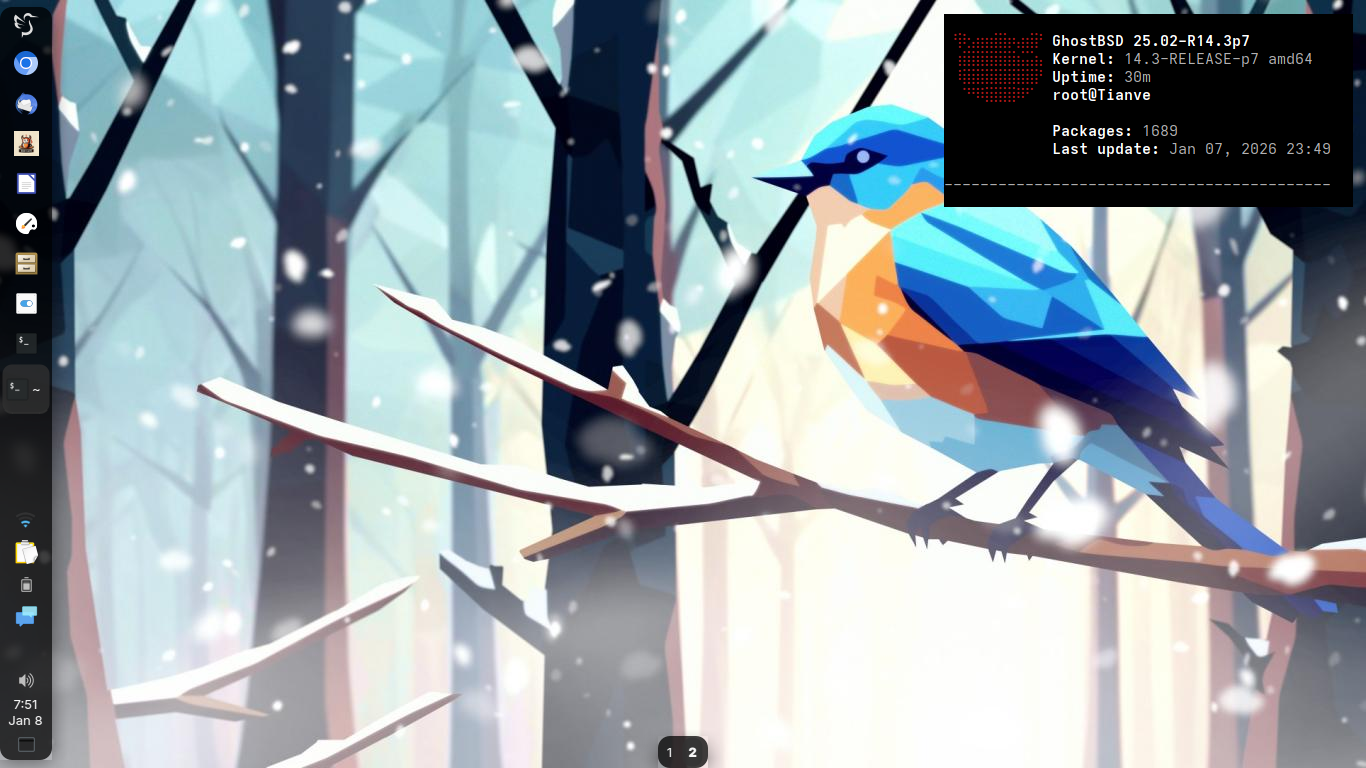
Secondary: "Tianve" - HP 250 G3
Kernel: 14.3-RELEASE-p7 amd64
Operating System: GhostBSD 25.02
LXQT Version: 2.3.0 (XFWM)
Qt Version: 6.10.1
Graphics Platform: X11
https://bsd-hardware.info/?probe=102fa9b597
Wallpaper "Oiseau d'hiver" by @orbite
#GhostBSD #FreeBSD #RunBSD #LXQT #X11 #QT #screenshot #desktop #unix
There’s a lot of misinformation going around claiming #GNOME is removing middle-click paste entirely — that’s not accurate.
GNOME (and #Firefox) developers are proposing changes to disable middle-click paste by default in future releases because it’s considered an old #X11-specific behavior that can be accidentally triggered.
Crucially:
— This proposal is about changing the default setting, not removing the functionality itself.
— The ability to paste with the middle mouse button isn’t being deleted; the default will just be off for new users.
— Users who want middle-click paste should still be able to re-enable it in settings (for example via GNOME Tweaks or a GSettings key).
So the narrative that the feature is gone for good is wrong — it’s simply being turned off by default, not deleted.
https://www.theregister.com/2026/01/07/gnome_middle_click_paste/
Secondary: "Tianve" - HP 250 G3
Kernel: 14.3-RELEASE-p7 amd64
Operating System: GhostBSD 25.02
LXQT Version: 2.3.0 (XFWM)
Qt Version: 6.10.1
Graphics Platform: X11
https://bsd-hardware.info/?probe=102fa9b597
Wallpaper "Oiseau d'hiver" by @orbite
#GhostBSD #FreeBSD #RunBSD #LXQT #X11 #QT #screenshot #desktop #unix
Wayland is replacing X11 as Linux’s display protocol, offering lower latency, simpler design, and stronger security. 🖥️
By restricting app access to input and screen data, it reduces long-standing privacy risks. 🔐
Gains are clear, but compatibility and tooling still slow full adoption. ⚖️
🔗 https://hintnal.com/the-great-display-revolution-how-wayland-is-reshaping-linuxs-graphical-future/
#TechNews #Linux #OpenSource #Privacy #Security #Software #Developers #Freedom #Technology #Computing #Wayland #X11 #Debian #Fedora #Ubuntu #Arch #FOSS #OS
Wayland is replacing X11 as Linux’s display protocol, offering lower latency, simpler design, and stronger security. 🖥️
By restricting app access to input and screen data, it reduces long-standing privacy risks. 🔐
Gains are clear, but compatibility and tooling still slow full adoption. ⚖️
🔗 https://hintnal.com/the-great-display-revolution-how-wayland-is-reshaping-linuxs-graphical-future/
#TechNews #Linux #OpenSource #Privacy #Security #Software #Developers #Freedom #Technology #Computing #Wayland #X11 #Debian #Fedora #Ubuntu #Arch #FOSS #OS