TAM and OMN tools for potential Bonfire workflows
This article looks at Techno Anarchist and Open Media Network tools that would boost efficiency and productivity in Bonfire workflows. And I will be paraphrasing heavily.
As mentioned in a previous TPF post, I plan to experiment with Bonfire and have taken notes for a series of articles.
This is the second one. The first is here if you inexplicably missed it. 😉
I have even reserved the domain manade.org to possibly run subdomains off of for various communities I am part of once I retire in France this spring. For now building a test instance is a priority.
And I have also built a new website for that project on the subdomain, http://site.manade.org. In fact it is so new, the hosting company still hasn't sorted the SSL certificate out. Hence the http. Sorry. 🤦🏽♂️
Anyway, while I explore the Bonfire documentation, I have concurrently been exploring and thinking about potential tools to use in building Bonfire communities.
And of course being who we are, they should be open source. And preferably based in the last bastion of democracy, the European Union.
So, let’s start a fire. 🔥
General Tools
Framatoolbox
Framasoft is one of several open source online services hosted with a strong commitment to the goal of decentralization.
So, using Framatoolbox is a big step on the road to your digital autonomy.
Framatoolbox is also a political proposal. It's exploring an alternative to surveillance capitalism by experimenting with the contribution society.
By offering uses, feedback and contributions to OmniTools ⬇️, Framasoft participates in maintaining a common resource.
OmniTools
You can boost your productivity with OmniTools. It's also the toolbox that make's you more efficient. Access thousands of user-friendly utilities to edit images, text, lists and data. And do so in your browser.
- Image Tools
- PDF Tools
- Text Tools
- JSON Tools
- CSV Tools
- XML Tools?
Vert
- File Converter Tools
Vert's image, audio, and document processing is done on your device. Videos are converted on their servers. So, no file size limit, no ads, and completely open source.
Writing
Markdown
Markdown helps you write for your website content, programming documentation, wiki, and project management. You are probably familiar with it and it's becoming standard.
Joplin
Joplin is an open source markdown note-taking app. You can capture your idea and access them from any device. You can even extend it with plugins and integrations.
I wrote this article on a tablet and laptop with it.
Creative
GIMP
If your requirements can’t be handled by OmniTools, GIMP is an open source image editor comparable to Photoshop.
Programming
Docker Desktop?
You can install Bonfire via Docker. But, I am not sure you can use Docker Desktop. I hope so, because as a half-ass frontend developer it’s the only hope in hell I have for doing this myself. 😈
A quick aside, if I can't get it going on my own, it may be in the summer before the Bonfire test instance will be done.
As this is likely, I will be looking for help setting up the instance. Someone near Toulouse, France with Bonfire experience would be great. Or I guess I could hire the Bonfire team as a last resort. Provided they give large discounts to journalists promoting the platform. 🤨
In any event, Docker Desktop simplifies the process of building, sharing, and running applications in containers, ensuring consistency across different environments.
And obviously, you can use regular Docker.
Mosaic
If you read our first article, you will be familiar with Mosaic. And it will be a major tool used to build Bonfire communities. It's Bonfire's tool after all.
It bridges to third-party tools that:
- import data from your existing tools
- transform that data into rich ActivityPub activities for federation
- enable meaningful, two-way interactions
- respect your privacy boundaries and governance needs
JSON
JSON is used in JSON Activity Streams with ActivityPub. The docs note:
"In the most basic sense, an "Activity" is a semantic description of an action. It is the goal of this specification to provide a JSON-based syntax that is sufficient to express metadata about activities in a rich, human-friendly but machine-processable and extensible manner."
ActivityPub
Social Docs
Social Docs is third-party documentation for ActivityPub, Mastodon, and the Fediverse.
ActivityPub Fuzzer?
Fuzzer is a small program to help build social media software on the Fediverse. It emulates known Fediverse software, helping solve the problem where developers have to manually test compatibility with dozens of other projects.
I am not sure if Bonfire is one of them, But, if it's not let's hope it will be soon.
Another quick aside peeps, get the fuck off GitHub.
ActivityPub Book
Written by Evan Prodromou, the coauthor of the ActivityPub protocol and the Activity Streams 2.0 data format, this is the ActivityPub handbook that every social software hacker needs.
I have it and am slowly reading it.
ActivityPub Rocks
ActivityPub Rocks is an informative site maintained by the current steward of the ActivityPub stack of standards.
Team Tools
Codeberg
Codeberg is a community-led effort that provides Git hosting for free/open source projects. It features: no tracking, no third-party cookies, and no profiteering. Everything runs on their servers in Europe. Your data is not for sale.
Forgejo
If you want to roll your own Git solution, Forgejo is the way to go. It's a self-hosted lightweight software forge. Being easy to install and low maintenance, it gets the job done.
OpenProject
OpenProject is open source project management software for open source developers. It gives you classic, agile, or hybrid project management in a secure environment.
For my test instance I will use something simpler. Probably NextCloud’s Deck tool.
XWiki
XWiki innovates with "Structured Wiki" and delivers high knowledge features.
Again for my test instance I will use something simpler. Maybe Zim.
Elixir
Backend
Bonfire is implemented with its own dialect of the Elixir language. Like me if you had not heard of it before, Elixir is similar to Ruby on Rails or Python.
It runs on the Erlang VM. And it's capable of web programming, embedding software, machine learning, data pipelines, and processing multimedia. So, it's mega flexible and functional.
I know nothing about it, but I researched tools and found these.
Elixir Tools Suite
elixir-tools is a suite of developer tooling and packages for Elixir developers. Their goal is to provide tooling good enough that you think they're part of the core language project.
Testing Tool
ExUnit
One of the testing frameworks for Elixir is ExUnit. It is built-into the Elixir language and is a simple and intuitive tool for writing tests.
ExUnit follows the xUnit style, which will be familiar to developers who have worked with other testing frameworks. It provides everything they need to write comprehensive tests for their Elixir applications.
Database Tool
Ecto
Ecto is a popular Elixir database library providing a high-level and composable query interface for interacting with databases. You can define schemas, perform complex queries, and manage database transactions. Ecto also offers built-in support for database migrations, making it easy to evolve your database schema over time.
Elixir School
The previous tools have lessons in Elixir School which appears to be an excellent resource.
Frontend
Phoenix
Phoenix let's you build web applications quickly, with less code and fewer moving parts. It also runs on the Erlang VM with the ability to handle millions of WebSocket connections alongside Elixir's tooling for building robust systems. You can also deploy it with Docker.
LiveView
LiveView's main contributor wanted to create dynamic server-rendered applications without writing JavaScript. He was tired of the inevitable ballooning complexity that it brings (amen). He built LiveView to fix it.
Surface UI
Surface UI is a server-side rendering component library for Phoenix. It let's you start building rich interactive user-interfaces while writing minimal custom Javascript.
That sound perfect to me.
Liveview Native
If you are building Native apps Liveview Native is a framework extends Phoenix LiveView to native platforms, enabling real-time, interactive native applications with a unified codebase.
Wrapping it up
And that is enough for now. As I am slowly learning about Bonfire, I think the tools above would fit well in Bonfire workflows.
In this article we explored:
- general productivity tools
- writing tools
- creative tools
- general programming tools
- ActivityPub tools
- Mosaic
- Elixir backend tools
- and Elixir frontend tools
Have I missed anything? As mentioned in my previous article, this is all new to me. And I've only gone through about 20 percent of the Bonfire documentation. So, let me know what to add, correct, update, etc. This request is especially sincere if you’re working on a Bonfire project now.
Together, let’s build something for our communities with Bonfire! 🔥
Grab a seat at our Bonfire: the revolutionary community platform
It's our view that Bonfire not only has the potential to revolutionize the Fediverse and Open Social Media but the internet as well.
Their motto is "Building blocks for communities". And they aim to:
- create digital spaces we actually control
- tolerate no billionaires, no algorithms, no enshittification
- and empower citizens to shape our own open social web.
We will be covering it extensively here on The Fulcrum. And as I mentioned in the first TPF of 2026, I personally have ambitious plans for it.
But first a disclaimer, this article is based on my notes from reading the Bonfire documentation and blog articles.
I did sign up for the playground instance yesterday and started exploring it as an user.
Obviously, I am not an expert and as a newbie I am primarily paraphrasing. In fact, I have never used it as an admin and pulled the screenshots in this article from Bonfire's sites.
Plus, Bonfire just released the stable version, 1.0. So, it's definitely a work in progress (which makes it exciting). You'll also see it's not easy for non-devs to get an instance going (yet).
The platform is incredibly unique. It is unusually developed in an unusual way. Not just a generic federation framework, Bonfire is a modular, federated social platform for building digital communities. It’s nebulous by design.
It's also:
- decentralized
- federated with ActivityPub
- extremely modular
- and community-first oriented with unique governance, moderation, and privacy models.
It has a strong focus on maintenance and stability as well. And they do extensive user testing. Big tech it's not.
ActivityPub lets it talk to the larger Fediverse. It's light but scalable. Extensions allow classic social networking, forums, project organizing, and more.
Also, Bonfire instances can be invite-only or open.
Also, I have linked to many of Bonfire's articles here so you can explore them after reading this article. In its entirety. 😈
Why it's different
Bonfire stands apart from other Fediverse platforms due to its Circles, Boundaries, and upcoming Groups (more on those below). Designed for extensibility and experimentation, it focuses on local-first, community-driven goverance. It's also more privacy/security-focused than its peers.
You can have four profiles per account which is unique. They show up as separate identities - personal, work, or a project/community one for examples.
Consequently, you have both account and profile settings.
And you can even create a personal blog with it. How cool is that?
In fact, it might (just maybe) have the potential to be the everything app of the open web.
In any event, it's very flexible, customizable, and even a little anarchic. It's messy but with unlimited potential.
That's why we've fallen in love with the idea of Bonfire. And we are going to help in a small way to bring that philosophy to fruition and to you!
Development Stack
Bonfire is implemented with its own dialect of the Elixir language. Elixir is similar to Ruby on Rails or Python. I am a PHP peep myself (and mainly a half-ass frontend developer at that), so I have a lot to learn. But at least I get the gist of it.
It runs on the Erlang VM. And it's capably of web programming, embedding software, machine learning, data pipelines, and processing multimedia. So, it's mega flexible and functional.
Phoenix is the web framework Bonfire uses. You build interactive web apps via Phoenix Livewire. The Model, Viewer, Controller pattern is used. And templates are built with HEEX which uses HTML and embedded Elixir to build components.
Plus, Bonfire has its own Phoenix Livewire sync called Surface. It's designed to be familiar to frontend developers. Surface view components are compiled into Livewire code.
A few extensions use the Absinthe GraphQL library to expose an API.
The database is PostgreSQL.
Hosting
Deployment and management of Bonfire can be via:
- Co-op Cloud
- Docker Container
- Bare Metal
- or a Package Manager.
Unfortunately, all of these are self-hosted at the moment or available via working with an agency like Autonomic or Bonfire itself.
Among many others, Developer Setup, Elixir, and Hosting guides are available in the docs.
Ok, we're stoked though slightly intimidated with the stack.
Administrators
Bonfire's firekeepers (aka administrators) have extensive means to control how their communities work.
This includes how they are federated.
Admins can also:
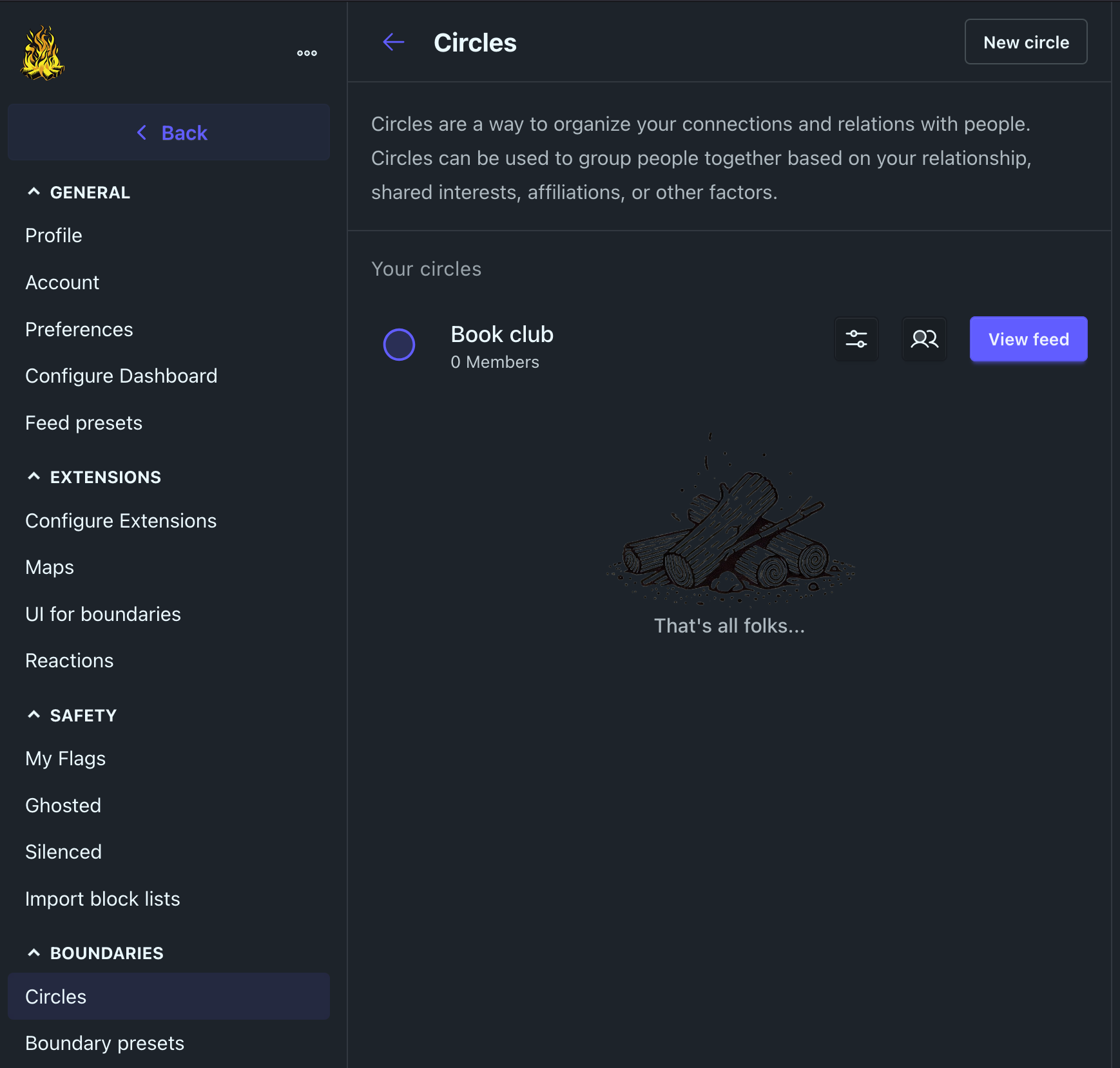
- sort other admins, moderators, and users into Circles (more on that below)
- assign roles and permissions for each circle or user
- and manage and import/export block lists.
Instance monitoring is via a "LiveDashboard". It uses Oban and Orion to maintain, manage, and update data as well as a Web Observer to view it.
Extensions
Extensions control functionality and user experience within Bonfire. Developers can create new extensions for capabilities not provided "out of the box".
They could include new features, integrations, or tools. In the box examples include Boundaries, posts, messages, maps, etc. Or you could battle misinformation.
In fact, Bonfire’s Mozaic initiative is “leveraging the Bonfire modular framework, to offer like-minded organizations and communities the opportunity to build custom extensions that connect their homegrown or third-party applications to the Fediverse.”
Hopefully, those that are FOSS and non-surveillance oriented. There's no need to do Techno Feudalists' evil deeds for them.
Flavors
Bonfire will eventually have six options for new installations. These apps are called Flavors and are based on use cases.
For now the functional ones are:
- Ember (which is basic and stable if you want to customize Bonfire)
- Social (which is recommended and in beta)
- Community (which is in Alpha)
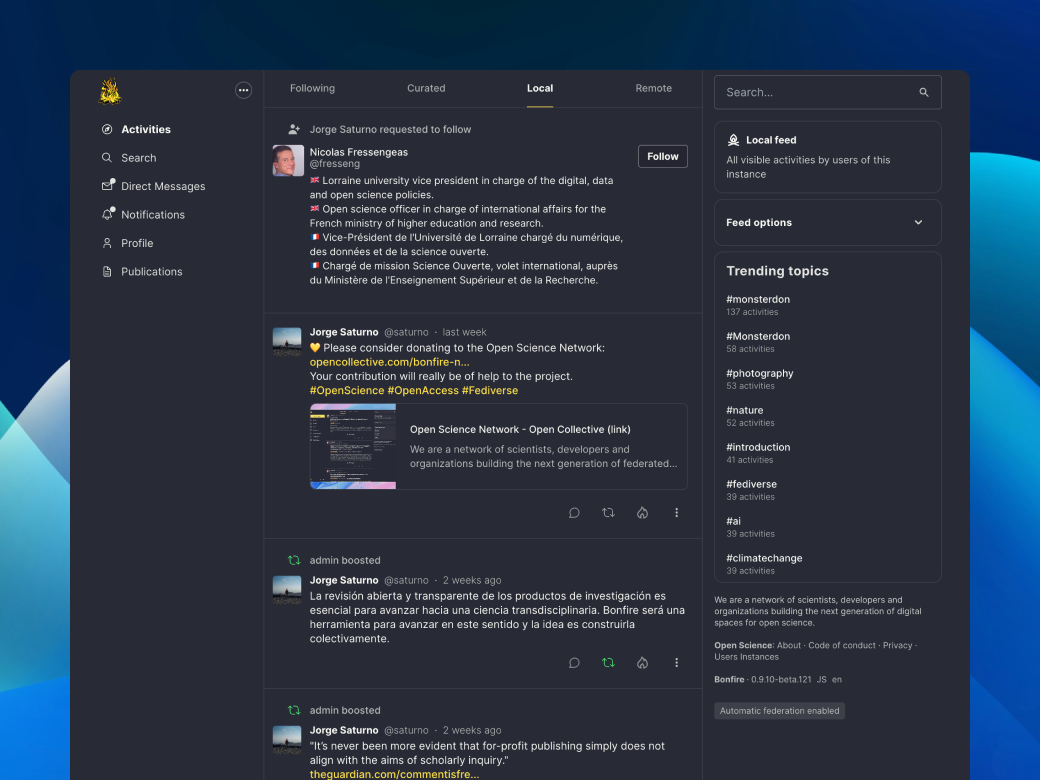
The Social flavor would be similar to other Fediverse apps with posts and follows. Again, Bonfire is unique with its Circles and Boundaries. It supports both microblogging and long-form formats. Posts can be public or private, include content warnings, privacy controls, etc.
The Community flavor will have group spaces and collaborative moderation. Again these are features unique to Bonfire.
And of course, you can switch flavors at any time.
Community / Users
Bonfire users have extensive control over their experience as well. There is a strong focus on privacy and safety. This sets it apart from say Mastodon. And again, so do its Boundaries, Circles, and roles.
A quick side note, the team is also working on native apps for Apple, Android, (and hopefully F-Droid) to complement the web format.
Boundaries
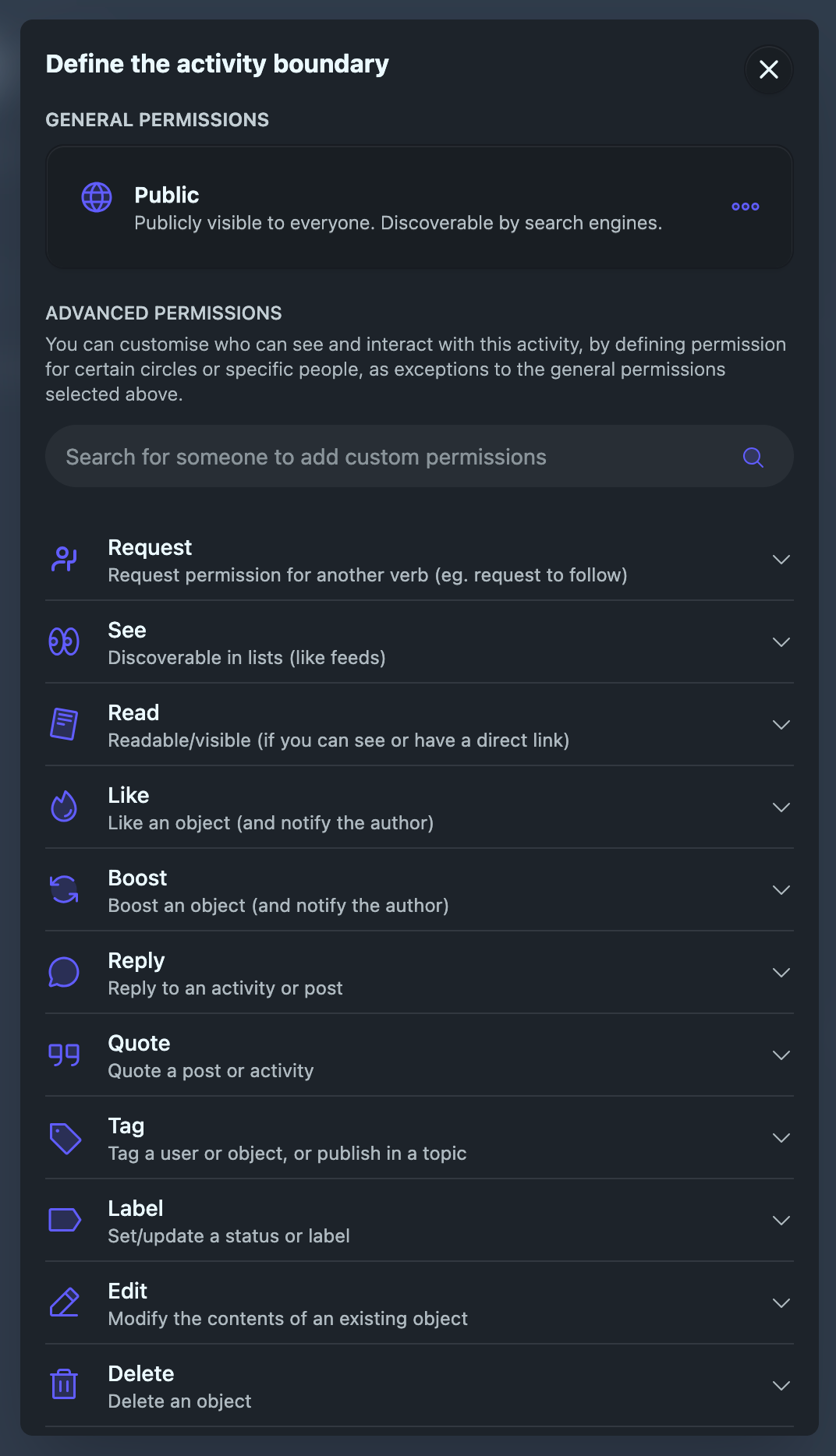
As you might expect, Boundaries are limits that you place on yourself or other users to control what you're comfortable with while using Bonfire.
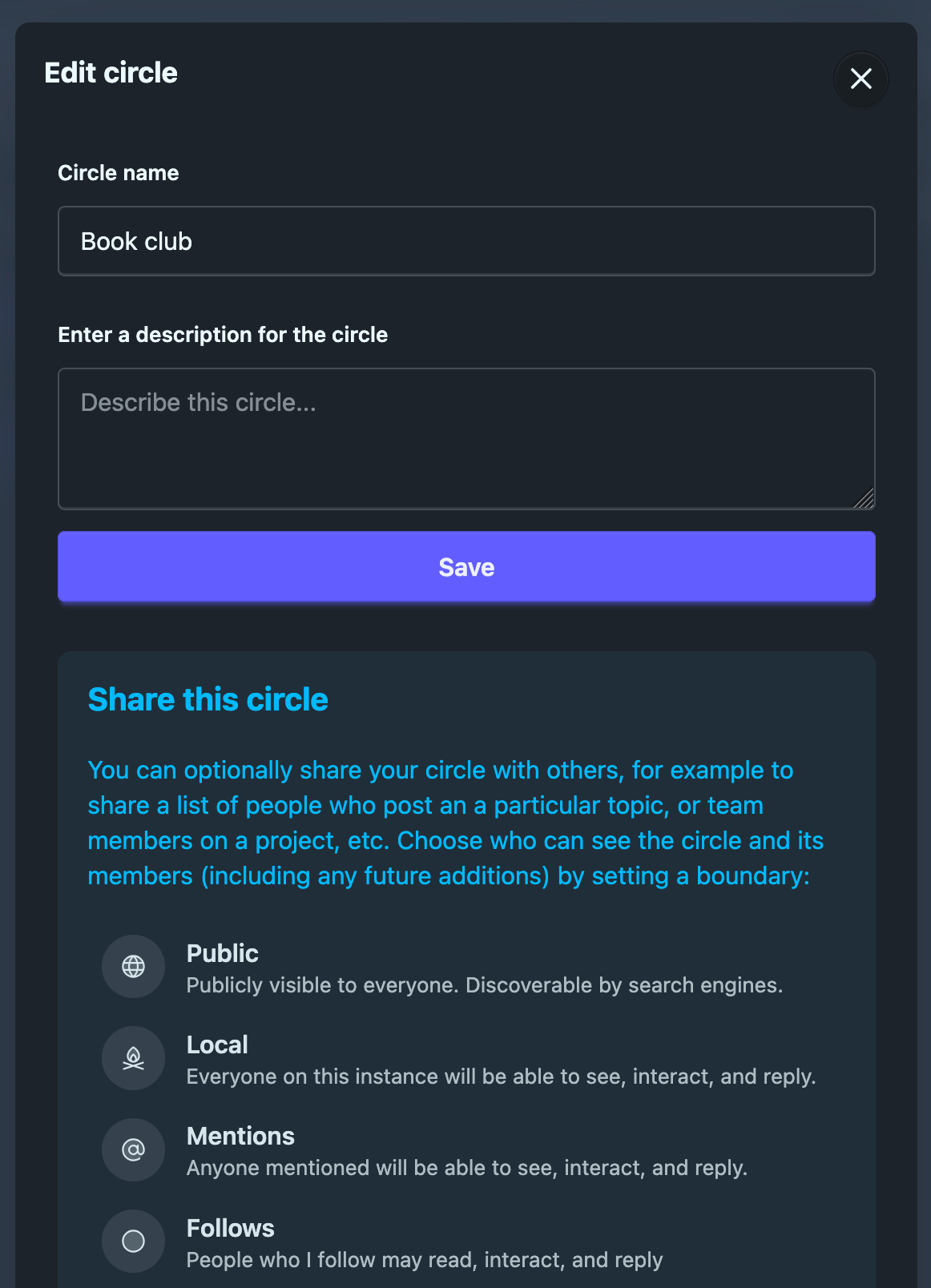
They control how others interact with individual users' content/posts/activities etc. As you can see in the image above there are many options.
Bonfire succinctly notes: "Boundaries takes things to the next level by enabling you to combine one or more circles and then grant specific roles to each circle."
And they are compatible with Mastodon quote authorizations and GoToSocial interaction controls.
Interoperability rules.
Speaking of, Bonfire proudly notes you can:
interact "across Mastodon, PeerTube, Mobilizon, and the wider Fediverse. Protocol bridges also connect you with Bluesky and beyond, breaking down walls between social platforms."
Good stuff.
Circles
Bonfire Circles are lists of users that individual users can create based on levels of trust and intimacy. And permissions control circle activities.
Shared Circles are co-managed by users and can include other Fediverse users (interoperability). Everyone in the Circle can be followed. Circles can also be used as lists or to filter sidebar feeds. And they can be made into custom feeds.
Great stuff.
Roles
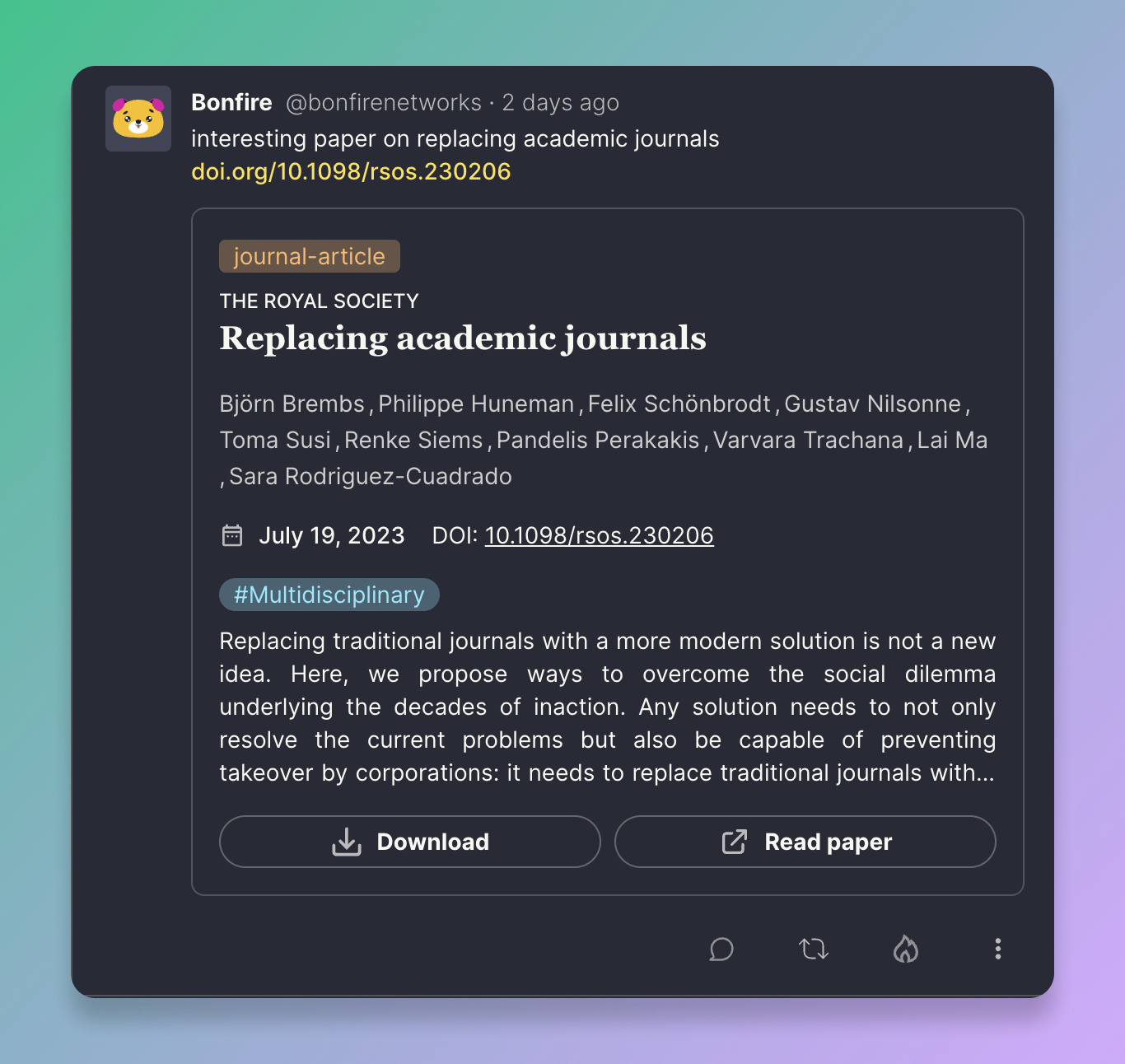
As you might expect, roles assign a set of permissions to users or circles. This allows them to perform specific actions. Or prevents them from doing so.
When you assign roles, you ensure that users or circles have levels of access and abilities based on their relationship with you or the purpose of the boundary, etc.
Groups
Bonfire’s dev team are currently working on adding group functionality.
There is not anything in the docs about what is coming. But, these details are in the linked article above:
“Shouting at the mythical "global town square" may be fine for chatter but it’s lousy for organizing. When you need specific people to see, act, and follow through, you need a group.
Federated groups in Bonfire will be spaces where communities gather to organize, care, and coordinate across the Fediverse. They'll live next to your personal feed, but with each group having a specific purpose: a study circle, a lab team, an activist collective, a project team, etc. Inside you’ll find posts, conversations, calendars, shared resources, and more. Crucially, groups will be portable and interoperable, so communities can grow and thrive without lock‑in.”
And there is more in this older one.
Obviously, this is extremely unique within the Fediverse and something very much to look forward to.
Fantastic stuff.
Normal Fediverse Functionality
Of course Bonfire has the features common across a variety of Fediverse platforms.
Feeds include these presets:
- following
- local
- remote (other platforms’ users)
- explore
- bookmarked
- trending
- and trending links
There are many more optional ones. And some of these have RSS feeds. Nice.
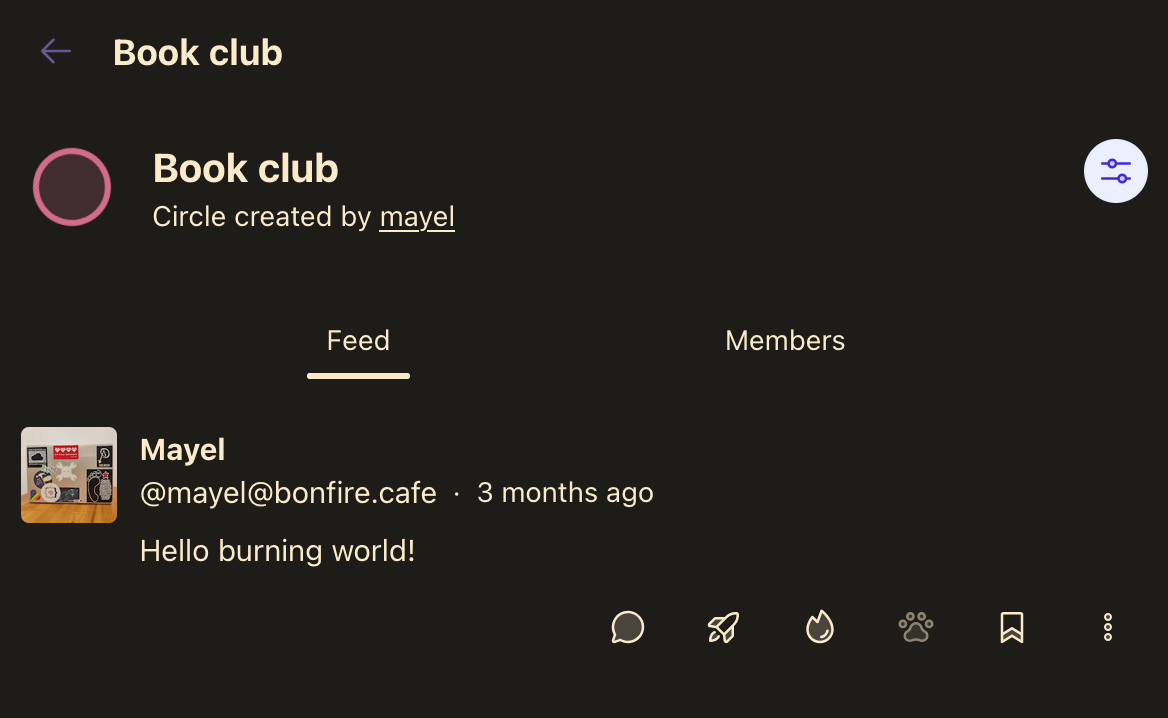
Users can create custom feeds for various contexts. A Circles feed would be an example. They can also control sort orders. You can filter and sort by content type, circle, date, engagement, source instance, etc.
Messages
Messages are private but not encrypted (yet). And they can be individual or group in nature.
Blocking
As noted earlier, Bonfire concentrates on privacy and security. So, it's extensive blocking options include:
- hide
- silence (you don't see individual users)
- ghost (individual users can't see you)
- block (combines silence and ghost)
- and import block list
Notificatons
Optional notifications include:
- follows
- requests
- mentions
- boosts
- likes
- and events, polls, group activities, etc.
Posting
Posts allow mentions, hashtags, and attachments. Obviously, you can interact with other non-Bonfire ActivityPub accounts.
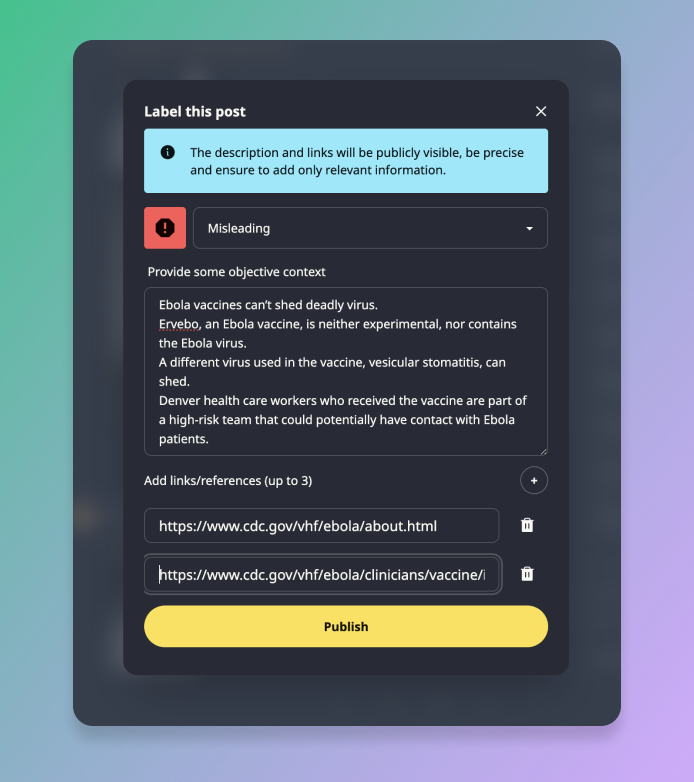
Bonfire also has flagging/labeling capabilities. Its useful for flagging misinformation.
And search works across the Fediverse which is nice.
RSS
Speaking of search and finding content, another unique and fantastic Bonfire feature are its RSS feeds. They are by profile and only feature public posts. Your follow feed presets are:
- local
- public
- and custom
Customization
Bonfire also presents many customization options for users.
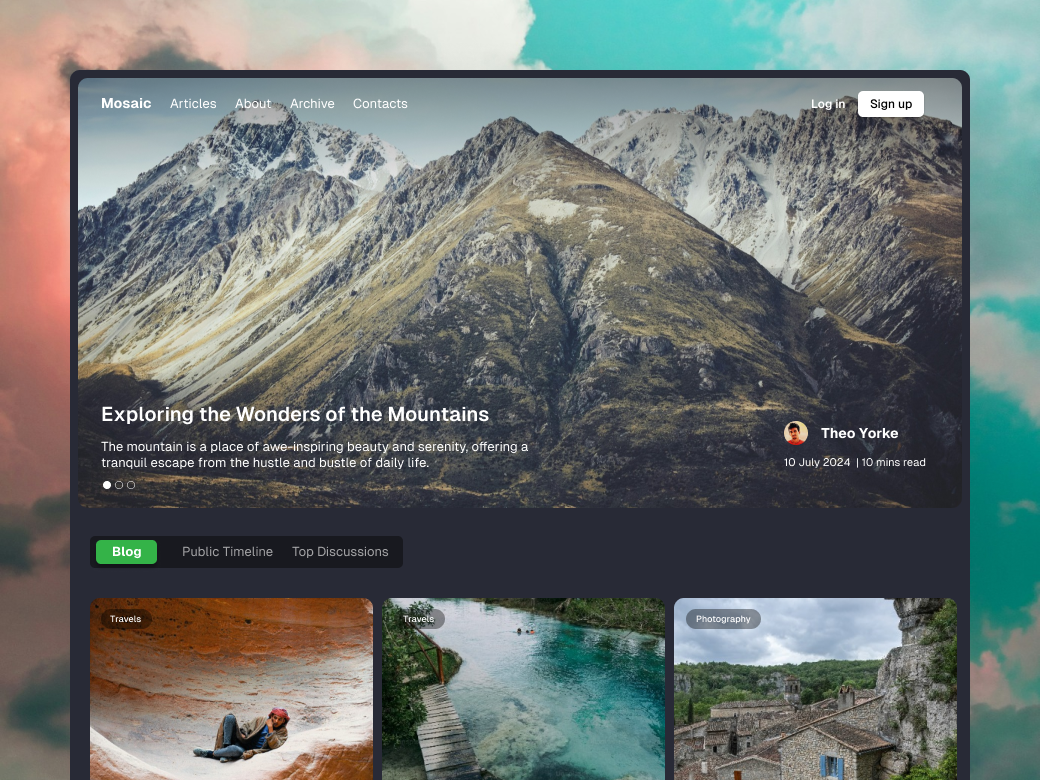
Profiles can include widgets like weather reports. The usual ones like Appearance (16 themes) and Feeds are customizable. Widgets also help customize the dashboard. And users can configure extensions as well.
Well-being controls include:
- mark all uploads as sensitive
- blur all media
- enable infinite scrolling
- and highlight notifications
Privacy and Safety controls include:
- enabling federation
- limiting direct messages
- controlling discoverability
- and allowing search indexing
Curated and trending topic controls include:
- show or hide
- and set amount of days and how many topics to show
So, there is much more customization on offer for Bonfire users as compared to those on other Fediverse platforms.
You can even add custom emojis.
Let's wrap it up for now
We have covered a lot here and mostly on the frontend and users. This is just the part of the iceberg that's above water. There's tons more information on how Bonfire works on the backend in their documentation. So, there's much more to explore in the future.
As you have seen, Bonfire has the potential to revolutionize the Fediverse and Open Social Media. I think it can revolutionize the entire internet as a formidable tool to support local communities. And we can leverage it to fight big tech, techno feudalism, fascism, surveillance capitalism, authoritarian governments, and other nasty things. Let’s wreck some Big Social ships (um silos).
With it we can create digital spaces we fully control. There is no need to tolerate billionaires, algorithms, or enshittification. We, the individual citizens of the world can shape our own open social web.
So, let’s support Bonfire and realize a revolution. Make a small financial donation like I do each month. Here's a second option for doing so.
Or better yet, support it via your time and expertise.
Or best of all, build a Bonfire instance for a community!
If you're interested, learn more from Bonfire’s articles and documentation that we linked to throughout this article.
And to close out, here's a video of the Bonfire playground instance. You can sign up here. It's of the social flavor and not federated. It's just for playing.
Finally, be sure to let us know what you think on the Fediverse or via the comments below. As I said, I hope to write more articles on this revolutionary framework so we can continue our journey to unfuck the internet together.
Let's start a big ass bonfire.
Follow us on the Fediverse
Share on Open Social Media

