Battle for Wesnoth - Campagne Liberté
🕶️ A bird's-eye view of a plain where the countryside blends harmoniously with the winding river, bordered to the east by mountain ranges leaving a passageway to the south-east for an army of invaders coming to attack Wesnoth castle located to the south of the plain. One of the protagonists defending the castle exclaims ‘Wha- How did so many of them flank us? We're cut off from Wesnoth!

📚️ The Battle for Wesnoth is a libre, multi-platform, single-player (AI) / multi-player (up to 8 in LAN / online) turn-based tactical strategy game with a high fantasy theme, in which the player recruits his troops to face powerful enemies, all in a very neat scenario. It is a mature game (nearly 20 years of development), very complete and of very high quality, offering several soundtracks, more than 200 types of finely detailed units, 16 races, 6 major factions, many campaigns and maps to download from the interface, and an editor.
🕶️ A bird's-eye view of a plain where the countryside blends harmoniously with the winding river, bordered to the east by mountain ranges leaving a passageway to the south-east for an army of invaders coming to attack Wesnoth castle located to the south of the plain. One of the protagonists defending the castle exclaims ‘Wha- How did so many of them flank us? We're cut off from Wesnoth! 📚️ The Battle for Wesnoth is a libre, multi-platform, single-player (AI) / multi-player (up to 8 in LAN / online) turn-based tactical strategy game with a high fantasy theme, in which the player recruits his troops to face powerful enemies, all in a very neat scenario. It is a mature game (nearly 20 years of development), very complete and of very high quality, offering several soundtracks, more than 200 types of finely detailed units, 16 races, 6 major factions, many campaigns and maps to download from the interface, and an editor.
🕶️ A view of its user interface (v. 3.0.3, dark theme, on my Linux PC, in French) with several tabs open showing different screenshots of Linux games. The active tab is open on a screenshot of the "Gameplay Football" game. I chose this image because it allows me to illustrate the use of the “Motion Blur” filter and because I'm not good enough at drawing to show my work :). Nevertheless, I tested this tool and found it to be both simple and powerful. Excellent.

On the top right are the image layers (only one for now) and below that is the history (only one: “Open an image”), both simple and practical. On the left are the drawing tools, and at the bottom are the color palette, image characteristics, and zoom. At the top, in the title bar, are the edit menus and menus.

📚️ Pinta is a lightweight, libre & multi-platform bitmap image editor inspired by Paint.NET, allowing you to draw and manipulate images in a simple but powerful way. It offers the classic drawing tools (freehand drawing, lines, rectangles, ellipses, ...), adjustment and effect tools (35 tools), a complete history (allowing you to go back in time), layer support (to separate and group elements of your image) and a flexible workspace (fixed and/or floating windows).
🕶️ A view of its user interface (v. 3.0.3, dark theme, on my Linux PC, in French) with several tabs open showing different screenshots of Linux games. The active tab is open on a screenshot of the "Gameplay Football" game. I chose this image because it allows me to illustrate the use of the “Motion Blur” filter and because I'm not good enough at drawing to show my work :). Nevertheless, I tested this tool and found it to be both simple and powerful. Excellent. On the top right are the image layers (only one for now) and below that is the history (only one: “Open an image”), both simple and practical. On the left are the drawing tools, and at the bottom are the color palette, image characteristics, and zoom. At the top, in the title bar, are the edit menus and menus. 📚️ Pinta is a lightweight, libre & multi-platform bitmap image editor inspired by Paint.NET, allowing you to draw and manipulate images in a simple but powerful way. It offers the classic drawing tools (freehand drawing, lines, rectangles, ellipses, ...), adjustment and effect tools (35 tools), a complete history (allowing you to go back in time), layer support (to separate and group elements of your image) and a flexible workspace (fixed and/or floating windows).
VS Code / VS Codium Tutorials
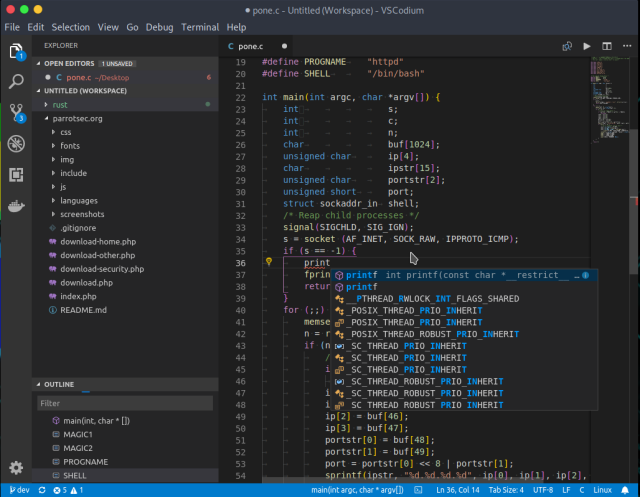
🕶️ A view of its user interface in a dark theme, with code editing on the right showing syntax highlighting, suggestions when entering code and code structuring in nested levels, the current project tree on the left, and the editor menus at the top and far left.

📚️ VSCodium is a telemetry-free fork (VSCodium=publishing Visual Studio Code binaries with "almost" no telemetry) of Visual Studio Code, the Microsoft libre, multi-platform code editor, combining the simplicity of a code editor with what developers need for their edit, build and debug cycle, and leaving more complex workflows to more comprehensive IDEs, such as Visual Studio IDE. It offers full support for editing, browsing and understanding code, as well as lightweight debugging, a rich extensibility model and lightweight integration with existing tools.
🕶️ A view of its user interface in a dark theme, with code editing on the right showing syntax highlighting, suggestions when entering code and code structuring in nested levels, the current project tree on the left, and the editor menus at the top and far left. 📚️ VSCodium is a telemetry-free fork (VSCodium=publishing Visual Studio Code binaries with "almost" no telemetry) of Visual Studio Code, the Microsoft libre, multi-platform code editor, combining the simplicity of a code editor with what developers need for their edit, build and debug cycle, and leaving more complex workflows to more comprehensive IDEs, such as Visual Studio IDE. It offers full support for editing, browsing and understanding code, as well as lightweight debugging, a rich extensibility model and lightweight integration with existing tools.
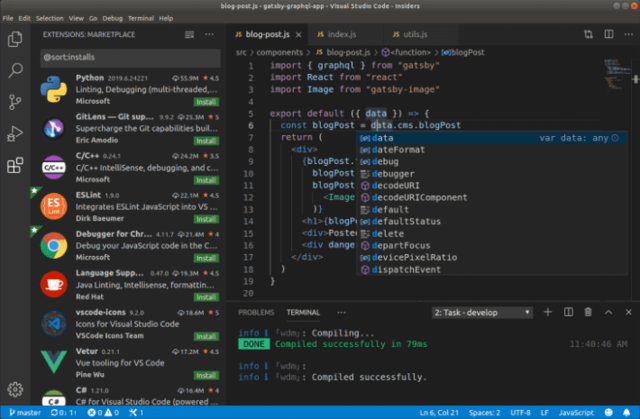
🕶️ A view of its UI with on the top right part the code editing showing syntax highlighting, suggestions when entering code, and structuring of the code in nested levels, underneath a message area showing the successful compilation of the current code, on the left an area showing a wide range of extensions for language support, debugging and other tools, and on the very top as well as on the far left the editor's menus.

📚️ Code-OSS (Visual Studio Code) is a libre, multi-platform code editor that combines the simplicity of a code editor with what developers need for their editing, building, and debugging cycle, and leaves more complex workflows to more comprehensive IDEs, such as the Visual Studio IDE. It offers full support for editing, navigating and understanding code, as well as lightweight debugging, a rich extensibility model and lightweight integration with existing tools. Visual Studio Code is a distribution of the Code - OSS repository with Microsoft-specific customizations released under a traditional Microsoft product license.
🕶️ A view of its UI with on the top right part the code editing showing syntax highlighting, suggestions when entering code, and structuring of the code in nested levels, underneath a message area showing the successful compilation of the current code, on the left an area showing a wide range of extensions for language support, debugging and other tools, and on the very top as well as on the far left the editor's menus. 📚️ Code-OSS (Visual Studio Code) is a libre, multi-platform code editor that combines the simplicity of a code editor with what developers need for their editing, building, and debugging cycle, and leaves more complex workflows to more comprehensive IDEs, such as the Visual Studio IDE. It offers full support for editing, navigating and understanding code, as well as lightweight debugging, a rich extensibility model and lightweight integration with existing tools. Visual Studio Code is a distribution of the Code - OSS repository with Microsoft-specific customizations released under a traditional Microsoft product license.
Blockbench Tutorials
🕶 ️ A view of its user interface (image taken from the website) with the current edition of a voxelized 3D lion with its 3D representation in the main central section, its textures and shapes on the left, the tree structure of its components (head, mane, ears, tail, legs) on the right, the tool menus at the top, and the current tab (lion.ego) below.

📚️ Blockbench is a libre, multiplatform, voxel-based 3D graphics editor aimed at designing low-poly models with pixel art textures. Its interface provides all the tools needed to create low-poly models, such as cuboids, mesh modelling tools for complex shapes, texture design and painting to dress them up, and animation (its animation editor lets you rig a model (create its skeleton) and use position, rotation and scale keyframes to bring it to life. Models can be exported in standardised formats for sharing, rendering, 3D printing or use in game engines. Its interface can be customised and enhanced using plugins.
🕶 ️ A view of its user interface (image taken from the website) with the current edition of a voxelized 3D lion with its 3D representation in the main central section, its textures and shapes on the left, the tree structure of its components (head, mane, ears, tail, legs) on the right, the tool menus at the top, and the current tab (lion.ego) below. 📚️ Blockbench is a libre, multiplatform, voxel-based 3D graphics editor aimed at designing low-poly models with pixel art textures. Its interface provides all the tools needed to create low-poly models, such as cuboids, mesh modelling tools for complex shapes, texture design and painting to dress them up, and animation (its animation editor lets you rig a model (create its skeleton) and use position, rotation and scale keyframes to bring it to life. Models can be exported in standardised formats for sharing, rendering, 3D printing or use in game engines. Its interface can be customised and enhanced using plugins.
Super Mario Bros. X - (TheXTech v1.3.6) New Super Mario Bros. X
Super Mario Bros. X Gameplay - Airship Attack (Super Mario ReInvent v1.1 (Build))
🕶️ A side view of the demo delivered with the engine (called Adventure of Demo, X-Tech engine version 1.3.4, tested on my Linux PC). It's a Mario-like game, but with its own original content, and the whole thing is really neat. There are cakes to collect on and under the platform.

📚️ TheXTech is a libre and multi-platform engine (and game), allowing the creation of games similar to Super Mario Bros. It is a faithful rewriting (but in C++, and multi-platform) of the SMBX engine, a Super Mario Bros engine written by fans (in VB6, only for Windows). TheXTech will remain the "vanilla" version (the equivalent of Chocolate Doom for Doom), with gameplay faithful to SMBX, while the PGE engine (from the same authors) is an improved version (the equivalent of GZDoom for Doom). TheXTech comes with a very impressive demo, allowing you to play Super Mario Bros, in solo or multiplayer, with many levels, in windowed or full screen, with the keyboard or the gamepad. Excellent!
🕶️ A side view of the demo delivered with the engine (called Adventure of Demo, X-Tech engine version 1.3.4, tested on my Linux PC). It's a Mario-like game, but with its own original content, and the whole thing is really neat. There are cakes to collect on and under the platform. 📚️ TheXTech is a libre and multi-platform engine (and game), allowing the creation of games similar to Super Mario Bros. It is a faithful rewriting (but in C++, and multi-platform) of the SMBX engine, a Super Mario Bros engine written by fans (in VB6, only for Windows). TheXTech will remain the "vanilla" version (the equivalent of Chocolate Doom for Doom), with gameplay faithful to SMBX, while the PGE engine (from the same authors) is an improved version (the equivalent of GZDoom for Doom). TheXTech comes with a very impressive demo, allowing you to play Super Mario Bros, in solo or multiplayer, with many levels, in windowed or full screen, with the keyboard or the gamepad. Excellent!
🕶️ A view of Goverlay's interface (superb, on a dark theme) showing on the left the vertical MangoHud settings tab (the Vulkan and OpenGL overlay for monitoring game-related system parameters), while the main part shows 5 tabs (Presets, Visual, Performance, Metrics, Extras), with the “Preset” tab selected. On the latter, 1 “Layouts” area with 5 buttons (Full, Basic, Basic Horizontal, FPS only, Custom) for selecting the physical aspect of the overlay, and 1 “Color Theme” area (Mangohud stock, Goverlay, Simple White, Old afterburner) for selecting a color theme. Further down, a “Blacklisted Apps” button, a “Global Enable” selector, a sandwich button and a green “Save” button.

📚️ MangoHud is a libre tool adding a graphical overlay (OpenGL and Vulkan support) allowing to monitor the system load (CPU/GPU load, framerate, temperatures, memory usage, and more). 
GOverlay is another complementary libre project delivering an interface to set up MangoHud, to choose what information will be displayed.
🕶️ A view of Goverlay's interface (superb, on a dark theme) showing on the left the vertical MangoHud settings tab (the Vulkan and OpenGL overlay for monitoring game-related system parameters), while the main part shows 5 tabs (Presets, Visual, Performance, Metrics, Extras), with the “Preset” tab selected. On the latter, 1 “Layouts” area with 5 buttons (Full, Basic, Basic Horizontal, FPS only, Custom) for selecting the physical aspect of the overlay, and 1 “Color Theme” area (Mangohud stock, Goverlay, Simple White, Old afterburner) for selecting a color theme. Further down, a “Blacklisted Apps” button, a “Global Enable” selector, a sandwich button and a green “Save” button. 📚️ MangoHud is a libre tool adding a graphical overlay (OpenGL and Vulkan support) allowing to monitor the system load (CPU/GPU load, framerate, temperatures, memory usage, and more). GOverlay is another complementary libre project delivering an interface to set up MangoHud, to choose what information will be displayed.
🕶️ A view of its user interface (v.5.6.249, on a dark theme, taken from the website) with the game scene in the center of the screen (2/3 of the screen, representing a water recreation area with a predominance of blue) and the settings menus on either side, with the main icons, buttons, and tabs above.

📚️ GDevelop is a libre (with additional paid features), multi-platform, mature, game engine & IDE, dedicated to the creation of multi-platform and/or HTML5 2D (and even 3D) games without programming knowledge, via an intuitive and powerful event-based system. The games created are royalty-free and license-free. In addition to its event-based system, it implements the JavaScript language to allow advanced users to extend its possibilities. It offers a resource manager (images, sounds, fonts, and access to a resource pack store), a scene editor (to position objects), an object editor (object creation), a layer editor (display layers), and an event editor (conditions & actions).
🕶️ A view of its user interface (v.5.6.249, on a dark theme, taken from the website) with the game scene in the center of the screen (2/3 of the screen, representing a water recreation area with a predominance of blue) and the settings menus on either side, with the main icons, buttons, and tabs above. 📚️ GDevelop is a libre (with additional paid features), multi-platform, mature, game engine & IDE, dedicated to the creation of multi-platform and/or HTML5 2D (and even 3D) games without programming knowledge, via an intuitive and powerful event-based system. The games created are royalty-free and license-free. In addition to its event-based system, it implements the JavaScript language to allow advanced users to extend its possibilities. It offers a resource manager (images, sounds, fonts, and access to a resource pack store), a scene editor (to position objects), an object editor (object creation), a layer editor (display layers), and an event editor (conditions & actions).
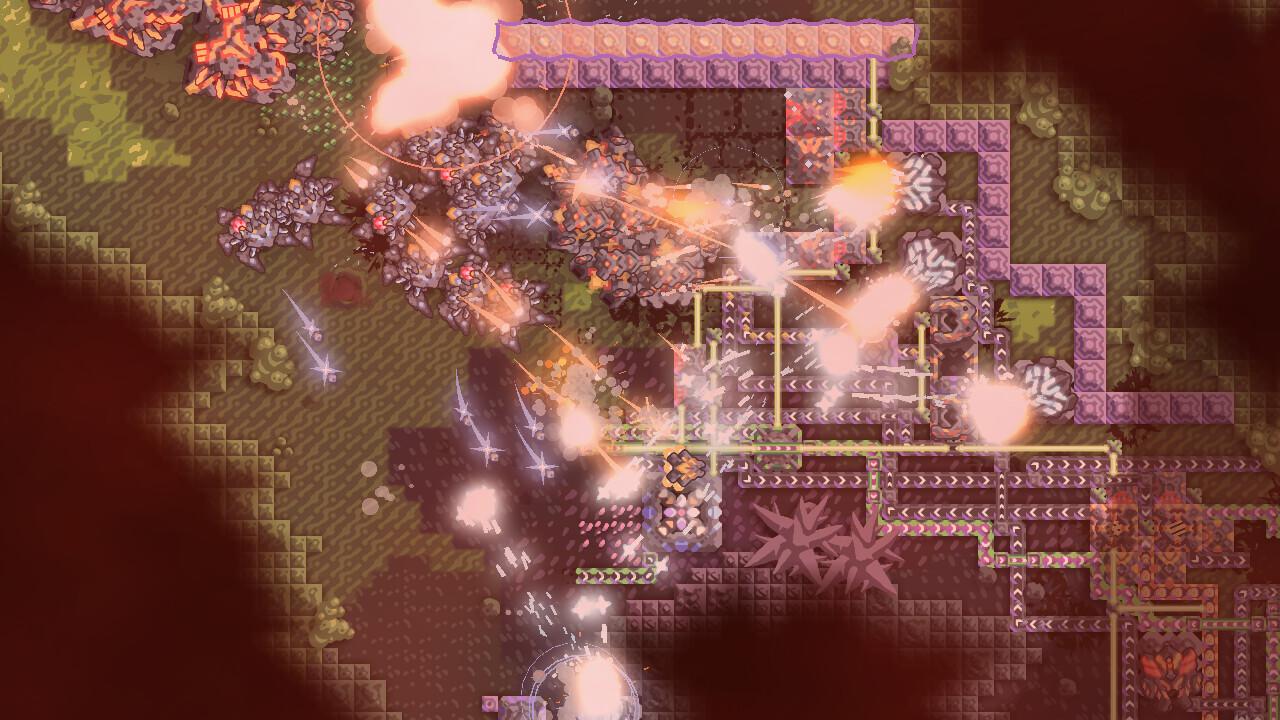
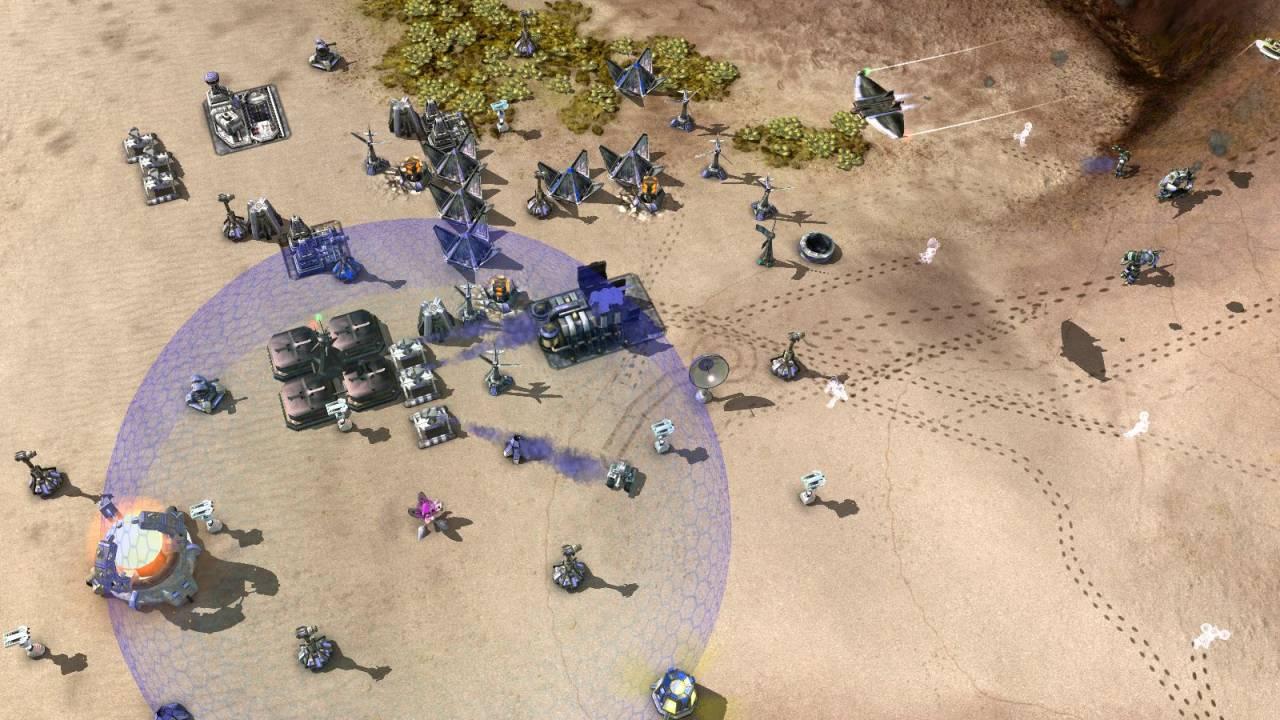
🕶️ An aerial view of a camp on a plain protected for the most part (notably its power plant) by a semi-transparent anti-missile dome. On the ground, combat units are moving away to the east, and in the air, a ship is approaching from the northeast. Numerous ground-to-ground and ground-to-air cannons surround the camp.

📚️ Zero-K is a (partially, see Wikipedia for the sound: CC BY-NC-ND) libre, multi-platform, single-player / multi-player RTS game with a sci-fi theme, a simple economy based on metal & energy, and featuring classic gameplay (4X for map supremacy) or tower defense (vs. increasingly powerful waves of monsters). The player starts with a mecha, extracts resources, builds his army and faces adversity on land, air & sea. A mature game designed by and for gamers, with 70+ missions, 100+ units, a clear interface, and an accomplished lobby client (solo/multi up to 32 players, co-op vs. other players and/or AIs, PVP, campaigns, content & player rating, content loading, fine tuning, ...). Fantastic!
🕶️ An aerial view of a camp on a plain protected for the most part (notably its power plant) by a semi-transparent anti-missile dome. On the ground, combat units are moving away to the east, and in the air, a ship is approaching from the northeast. Numerous ground-to-ground and ground-to-air cannons surround the camp. 📚️ Zero-K is a (partially, see Wikipedia for the sound: CC BY-NC-ND) libre, multi-platform, single-player / multi-player RTS game with a sci-fi theme, a simple economy based on metal & energy, and featuring classic gameplay (4X for map supremacy) or tower defense (vs. increasingly powerful waves of monsters). The player starts with a mecha, extracts resources, builds his army and faces adversity on land, air & sea. A mature game designed by and for gamers, with 70+ missions, 100+ units, a clear interface, and an accomplished lobby client (solo/multi up to 32 players, co-op vs. other players and/or AIs, PVP, campaigns, content & player rating, content loading, fine tuning, ...). Fantastic!
🕶️ In the background a bird's eye view of a landscape map with monuments, ancient buildings and what appear to be monsters, in the foreground and to the right the command interface and in the center the fantasy units and the counting of available resources.

📚️ Heroes of Might and Magic III (Heroes of Might and Magic III: The Restoration of Erathia, Heroes III, HoMM3) is the 3rd installment of a series of medieval fantasy turn-based strategy games released in 1999, in which the player leads a number of heroes commanding their legion of creatures in a crusade to help Queen Catherine Ironfist reclaim her lands conquered by hordes of undead led by Gryphonheart, her late father, former King of Erathia, who was murdered by traitors and resurrected as the undead. VCMI is a libre, multi-platform, compatible and improved engine (high resolution support, advanced and easy mod support, random map generator, zoom, ...).
🕶️ In the background a bird's eye view of a landscape map with monuments, ancient buildings and what appear to be monsters, in the foreground and to the right the command interface and in the center the fantasy units and the counting of available resources. 📚️ Heroes of Might and Magic III (Heroes of Might and Magic III: The Restoration of Erathia, Heroes III, HoMM3) is the 3rd installment of a series of medieval fantasy turn-based strategy games released in 1999, in which the player leads a number of heroes commanding their legion of creatures in a crusade to help Queen Catherine Ironfist reclaim her lands conquered by hordes of undead led by Gryphonheart, her late father, former King of Erathia, who was murdered by traitors and resurrected as the undead. VCMI is a libre, multi-platform, compatible and improved engine (high resolution support, advanced and easy mod support, random map generator, zoom, ...).
🕶️ A view of its UI at startup, with "Game Select" (enabled by default), "PWAD Select", "Game Options" and "Resource Locations" tabs. On the activated tab, the identified/set content is displayed (DOOM Shareware v1.9, Freedoom: Phase 2 v0.12.1, ...). At the bottom of the UI, a "Don't Show This Again" checkbox, and "Quit" and "Play!" buttons.

📚️ Odamex is a libre, multi-platform, single-player / multi-player Doom source port, focusing on online play (up to 255 players in client/server mode, on-the-fly WAD download) and the feel of the original version, while improving it (removing its limitations, new security features, editing and game options).  It is compatible with Doom 1 (Ultimate Doom) & 2, Final Doom, Doom Shareware, FreeDoom, and Chex Quest. It supports modern hardware (joysticks, widescreens, Ultra-High Resolution up to 8K, 32-bit rendering & true color, ...), new game modes (Horde, Survival, Last Man Standing, ...) and competition features (warm-up, rounds, player queues, ...).
🕶️ A view of its UI at startup, with "Game Select" (enabled by default), "PWAD Select", "Game Options" and "Resource Locations" tabs. On the activated tab, the identified/set content is displayed (DOOM Shareware v1.9, Freedoom: Phase 2 v0.12.1, ...). At the bottom of the UI, a "Don't Show This Again" checkbox, and "Quit" and "Play!" buttons. 📚️ Odamex is a libre, multi-platform, single-player / multi-player Doom source port, focusing on online play (up to 255 players in client/server mode, on-the-fly WAD download) and the feel of the original version, while improving it (removing its limitations, new security features, editing and game options). It is compatible with Doom 1 (Ultimate Doom) & 2, Final Doom, Doom Shareware, FreeDoom, and Chex Quest. It supports modern hardware (joysticks, widescreens, Ultra-High Resolution up to 8K, 32-bit rendering & true color, ...), new game modes (Horde, Survival, Last Man Standing, ...) and competition features (warm-up, rounds, player queues, ...).
🕶️ A bird's eye view of a station where several suburban or freight trains are approaching or parked, overlooked by a footbridge and a bridge. Near the station a road network and suburban dwellings. The graphics are a bit pixelated considering the age of the game and the close-up.

📚️ Open Transport Tycoon is a libre, multi-platform, single-player / multi-player (up to 255) business simulation game, based and compatible (but autonomous & enhanced) with the Transport Tycoon Deluxe game (1994). The player builds his transport network (trucks, buses, trains, planes & ships) to transport passengers and freight, with the goal of being as profitable as possible. The dividends received by these transports can be reinvested in the extension of the network or the acquisition of vehicles. A mature and actively maintained project.
🕶️ A bird's eye view of a station where several suburban or freight trains are approaching or parked, overlooked by a footbridge and a bridge. Near the station a road network and suburban dwellings. The graphics are a bit pixelated considering the age of the game and the close-up. 📚️ Open Transport Tycoon is a libre, multi-platform, single-player / multi-player (up to 255) business simulation game, based and compatible (but autonomous & enhanced) with the Transport Tycoon Deluxe game (1994). The player builds his transport network (trucks, buses, trains, planes & ships) to transport passengers and freight, with the goal of being as profitable as possible. The dividends received by these transports can be reinvested in the extension of the network or the acquisition of vehicles. A mature and actively maintained project.