VS Code / VS Codium Tutorials
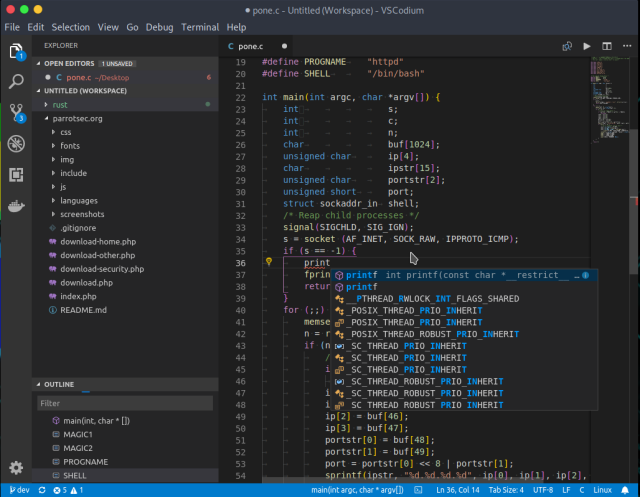
๐Ÿ•ถ๏ธ A view of its user interface in a dark theme, with code editing on the right showing syntax highlighting, suggestions when entering code and code structuring in nested levels, the current project tree on the left, and the editor menus at the top and far left.

๐Ÿ“š๏ธ VSCodium is a telemetry-free fork (VSCodium=publishing Visual Studio Code binaries with "almost" no telemetry) of Visual Studio Code, the Microsoft libre, multi-platform code editor, combining the simplicity of a code editor with what developers need for their edit, build and debug cycle, and leaving more complex workflows to more comprehensive IDEs, such as Visual Studio IDE. It offers full support for editing, browsing and understanding code, as well as lightweight debugging, a rich extensibility model and lightweight integration with existing tools.
๐Ÿ•ถ๏ธ A view of its user interface in a dark theme, with code editing on the right showing syntax highlighting, suggestions when entering code and code structuring in nested levels, the current project tree on the left, and the editor menus at the top and far left. ๐Ÿ“š๏ธ VSCodium is a telemetry-free fork (VSCodium=publishing Visual Studio Code binaries with "almost" no telemetry) of Visual Studio Code, the Microsoft libre, multi-platform code editor, combining the simplicity of a code editor with what developers need for their edit, build and debug cycle, and leaving more complex workflows to more comprehensive IDEs, such as Visual Studio IDE. It offers full support for editing, browsing and understanding code, as well as lightweight debugging, a rich extensibility model and lightweight integration with existing tools.
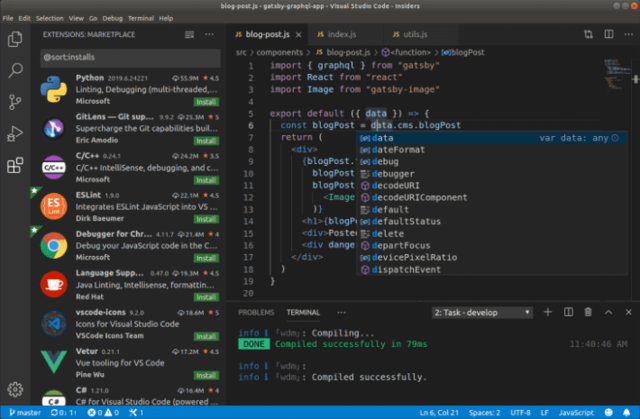
๐Ÿ•ถ๏ธ A view of its UI with on the top right part the code editing showing syntax highlighting, suggestions when entering code, and structuring of the code in nested levels, underneath a message area showing the successful compilation of the current code, on the left an area showing a wide range of extensions for language support, debugging and other tools, and on the very top as well as on the far left the editor's menus.

๐Ÿ“š๏ธ Code-OSS (Visual Studio Code) is a libre, multi-platform code editor that combines the simplicity of a code editor with what developers need for their editing, building, and debugging cycle, and leaves more complex workflows to more comprehensive IDEs, such as the Visual Studio IDE. It offers full support for editing, navigating and understanding code, as well as lightweight debugging, a rich extensibility model and lightweight integration with existing tools. Visual Studio Code is a distribution of the Code - OSS repository with Microsoft-specific customizations released under a traditional Microsoft product license.
๐Ÿ•ถ๏ธ A view of its UI with on the top right part the code editing showing syntax highlighting, suggestions when entering code, and structuring of the code in nested levels, underneath a message area showing the successful compilation of the current code, on the left an area showing a wide range of extensions for language support, debugging and other tools, and on the very top as well as on the far left the editor's menus. ๐Ÿ“š๏ธ Code-OSS (Visual Studio Code) is a libre, multi-platform code editor that combines the simplicity of a code editor with what developers need for their editing, building, and debugging cycle, and leaves more complex workflows to more comprehensive IDEs, such as the Visual Studio IDE. It offers full support for editing, navigating and understanding code, as well as lightweight debugging, a rich extensibility model and lightweight integration with existing tools. Visual Studio Code is a distribution of the Code - OSS repository with Microsoft-specific customizations released under a traditional Microsoft product license.